
中文翻譯 #
Introducing Sql Console: A Lightweight, Bastion-Ready SQL Terminal Powered by Go & Java 21 #
In modern cloud infrastructure, production databases are usually tucked away securely inside private subnets. As DBAs, DevOps, and Site Reliability Engineers, our only entry point to troubleshoot or manage these systems is typically through a highly restricted Bastion Host (Jump Host).
However, doing database work on a bastion host often comes with frustrating trade-offs:
- The Messy Standard CLIs: Running a quick
SELECT *in native command-line interfaces can instantly flood your terminal with unreadable, badly wrapped text blocks. - No GUI Allowed: Due to security compliance, you can’t install resource-heavy GUI clients (like DBeaver or DataGrip) directly on the jump host, nor can you expose database ports to the public internet.
- Clunky Data Exports: Generating a quick CSV or Excel extract for business teams usually requires writing bespoke scripts or dealing with annoying format conversions.
To bridge this gap, I built Sql Console — a lightweight, multi-purpose SQL terminal designed specifically for modern infrastructure and restricted jump hosts.
Architecture: The Best of Both Worlds (Go + Java) #
Sql Console leverages a unique Client-Daemon split architecture to deliver an uncompromising console experience.
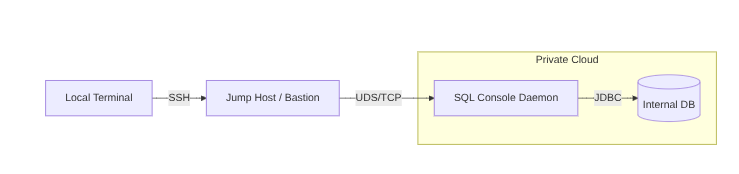
- Go Client (Go 1.20+): Handles lightning-fast CLI argument parsing, interactive Terminal UI (TUI) rendering, and stream file exporting (Excel/CSV).
- Java Daemon (Java 21 + Gradle): Takes care of heavy lifting like robust JDBC connection pool management, SQL query execution, and fast result set serialization.
- Bilingual IPC Protocol: The client and daemon talk locally over Unix Domain Sockets (UDS) using NDJSON (Newline Delimited JSON) for ultra-low latency and strict local-only security.
By putting the Go client on the frontline, we keep memory usage minimal, while the Java 21 daemon ensures mature, high-performance database connectivity via the extensive JDBC ecosystem.
Key Features #
🚀 Bastion Ready & Lightweight #
Sql Console requires zero complex configuration and is optimized for Debian/Ubuntu systems. It respects the tight constraints of corporate jump hosts while granting power users a premium command-line workbench.
📊 Rich TUI with Smart Pagination (\p)
#
Tired of queries breaking your terminal? Interactive mode provides structural schema browsing (such as \dt to list tables) and structured text tables. It automatically streams result sets page-by-page (e.g., 20 rows at a time). Simply type \p 2 to hop to the next page smoothly.
💾 One-Shot Stream Export (Excel / CSV) #
Need data extracted fast? You don’t have to stay in interactive mode. Use the client command line with the -o flag to stream query outputs straight into a local CSV or Excel file. This sidesteps terminal rendering entirely, making it incredibly fast even for massive datasets.
🔒 Enterprise Auditing & Built-in Masking #
Production access requires accountability. Every database connection attempt, query execution, and administrative action is safely logged to logs/audit.log. To prevent accidental credential leaks, the logging engine automatically filters and masks sensitive strings like PASSWORD or IDENTIFIED BY.
Quick Start #
1. Installation (Debian Base) #
Ensure you have Java 21+ runtime ready, then install the package:
|
|
2. Profile Management #
Profiles let you map out secure connection credentials globally (/etc/sql-console/profiles) or per-user (~/.sql-console/profiles):
|
|
3. Jump Into the Interactive REPL #
Start querying with an elegant, responsive interface:
|
|
4. Direct CLI Data Exporting #
Run a query and save it directly to a local report file in one command:
|
|
What’s Next? (Contributing & Open Source) #
Sql Console was born out of real-world database administration pain points. By combining the sleekness of Go with the unmatched data-handling pedigree of Java’s JDBC ecosystem, we want to give terminal-bound developers their productivity back.
The core codebase is structured clean under work.pollochang.app.sqlconsole. We are actively expanding database compatibility and polishing advanced TUI interactions.
If this tool makes your bastion host workflows a little less painful, feel free to check out the repo, file issues, or send over a Pull Request!
- GitHub Repository: sql-console
- Development Guide: Check out
DEVELOP.mdin the repo root.